The Difference Between DPI and PPI (And Why It Matters for Printing)
What is PPI?
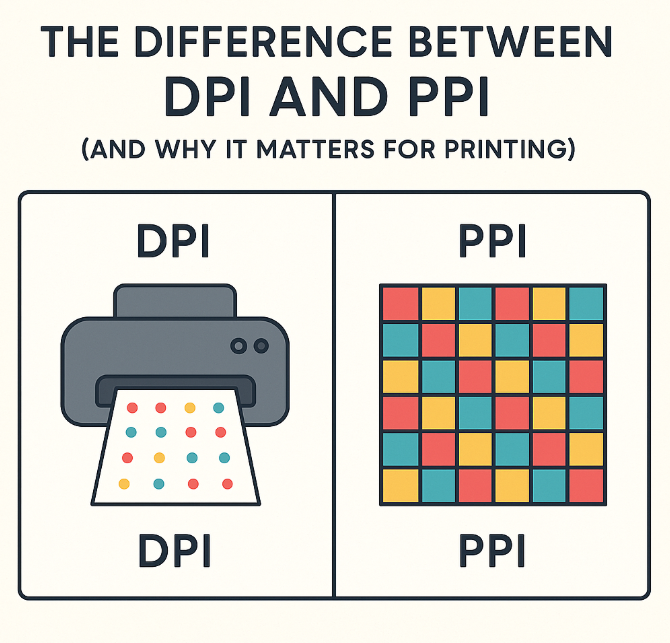
PPI stands for Pixels Per Inch. It refers to the resolution of a digital image—the number of pixels displayed in every inch of your file. The higher the PPI, the more pixel data exists in that inch, and the sharper your image will appear, especially when printed.
Most print-on-demand platforms (like ours) ask for images to be at least 300 PPI for quality results. This ensures crisp detail and prevents your artwork from looking blurry or pixelated when enlarged.
👉 Think of PPI as what you’re feeding the printer.
What is DPI?
DPI, or Dots Per Inch, refers to the physical printing process—how many tiny dots of ink a printer lays down per inch on the paper. DPI is a hardware setting, determined by the printer itself, and it doesn’t affect your digital file directly.
Traditional offset printers, like those used for magazines or mass-run posters, often print at 150 to 300 DPI or higher. But for artists using giclée inkjet printers (which is what most POD services use), DPI is handled automatically and isn’t something you need to adjust.
👉 DPI is about how the printer spits ink, not how your file is made.
Why the Confusion?
Design software sometimes mixes the two up. You might see “DPI” in export settings when it’s really referring to “PPI.” Even seasoned creatives occasionally blur the line. The confusion exists because both involve detail per inch, but in very different ways.
Here’s a quick trick:
- 🖥 PPI = Your File
- 🖨 DPI = The Printer
Do You Need to Worry About DPI?
Not really—especially if you’re uploading to a print-on-demand site.
Since modern giclée printers manage DPI internally, all you need to focus on is uploading a high-resolution image at 300 PPI and ensuring the dimensions (in inches) match what you want printed.
For example:
An image meant to be printed at 10 x 10 inches should be 3000 x 3000 pixels (300 PPI).
If you’re submitting to a gallery or a contest and they mention DPI, it’s likely they actually mean PPI—double-check with them, but you can usually prepare your files the same way.
Final Thought
You don’t need to become a tech wizard to sell or submit your art successfully. But understanding this basic difference between DPI and PPI can help you avoid the heartbreak of blurry prints or rejected uploads.
💡 Remember: focus on size and pixel resolution. A crisp, well-prepared file tells your printer—and your audience—that you’re a pro.